1. Go to the right website and log in
Go to the Supply Chain portal (SCP).
Use your credentials to log in.
2. Shipment overview
Go to Shipment – Shipment overview

3. Select the desired shipment
Select the desired shipment in the shipment overview screen.

4. Select the Edit button
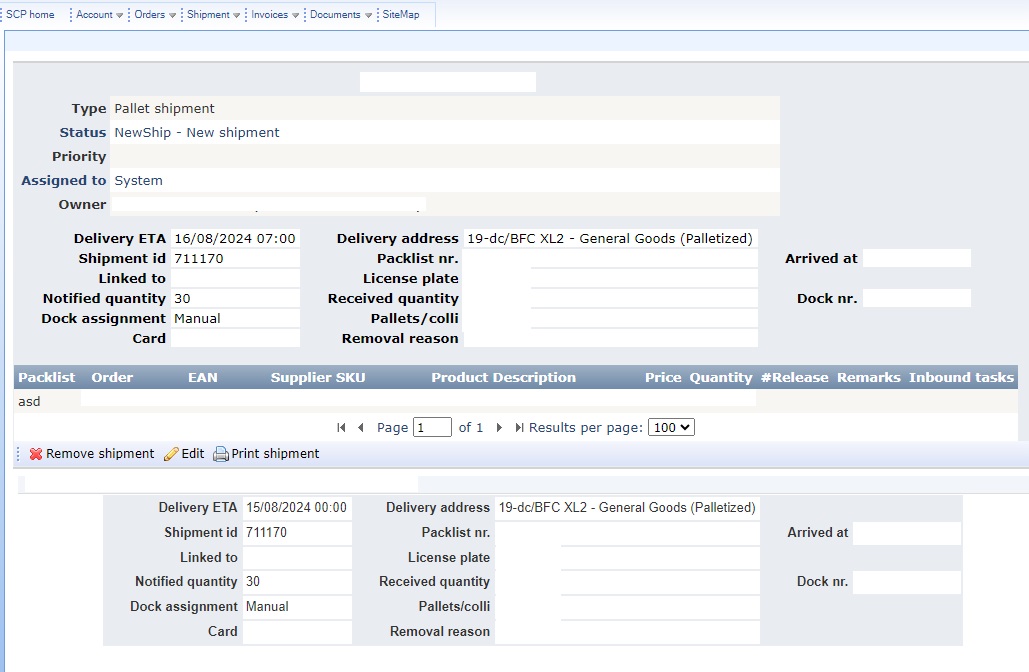
At the bottom of the list of EANs/products included in the pre-announcement, there is a bar with options such as Remove shipment, Edit and Print shipment
Hit the Edit button.

5. Change the date
After pressing the Edit button the fields for Delivery ETA and License plate in the top information box will become editable.
Enter the desired delivery date here, this date must always be in the future. The time should also always be adjusted, it can be set to 07.00. Delivery can still take place throughout the day, the time change is necessary for system purposes.
Note: When adjusting a pre-announcement to todays date, the time must be set in the future. For example, if you are making changes at 10.00 and setting the delivery for today, you should adjust the time to 10.15.
Once you have entered the desired changes, click Ok.

6. Done
If the change is succesfully applied, the shipment date will be updated. Additionally a message will be logged in the shipment history showing the previous delivery date.