SSCC for EDI suppliers

As of December 31, 2021, all logistic shipping units delivered to bol must be provided with GS1 label(s) containing a Serial Shipping Container Code (SSCC label). Read below what this means. Also make sure to carefully review this page, where you can find instructions on how to correctly prepare and ship your delivery to bol with an SSCC shipping label.

Our EDI partner

Our EDI partner Transus will actively support suppliers in integrating the SSCC data into their DESADV messages. If useful for you, Transus (for a fee) also offers the possibility to generate SSCC labels on your behalf. Please contact Transus for SSCC support by creating a support ticket in the Transus Portal or by sending an email to support@transus.nl

How do I create a shipping label including SSCC?

Unlike a supplier working with the SCP, suppliers with an EDI connection must create their own shipping label that complies with the GS1 standards for a shipping label including SSCC, as well as the requirements bol sets in the delivery conditions for shipping labels.

There are several rules imposed by GS1 that the shipping label must comply with. These are:

An SSCC code consists of 18 digits, these 18 digits are built up from
  • Extension digit. Used to increase the serial number range of the SSCC identification → free to use by the assigning party
  • GS1 Company Prefix. The GS1 prefix of the party creating the SSCC code
  • Serial Number. Freely chosen serial number to uniquely identify a logistic unit. The recommendation is to use sequential numbers. No reuse within 12 months
  • Check digit. Calculated control digit based on the first 17 digits of the SSCC code

Layout of the shipping label

Alle GS1-regels waar het verzendlabel aan moet voldoen zijn op de terug te vinden. Raadpleeg deze pagina voor meer uitleg.

All GS1 rules that the shipping label must comply with can be found on the GS1-webpage. Please refer to this page for further explanation.

1. Desired layout of the label

  • At the top of the label clearly state the “From” (Return address) and “To”
  • In the middle of the label include the SSCC code and the packing list number
  • At the bottom of the label add the SSCC barcode + the code written out in text
  • GS1-128 barcodes must be distinguishable from Code 128 barcodes by using the special Function 1 character (FNC1) after the start character
  • The label format must be A5 or A6

2. The size of all text on the label must be at least 3 mm. Note! This does not refer to “font size” but to the actual printed size.

Ensures that all text is large enough to be read clearly by both scanners and staff.

3. The size of all text on the label must be at least 3 mm. Note! This does not refer to “font size” but to the actual printed size.

Ensures that all text is large enough to be read clearly by both scanners and staff.

4. Make sure the packing list is clearly stated on the label and indicate that it is the packing list. Example: PACKLIST: EXAMPLEBOL.COM123

Ensures that bol can easily link the shipment to the correct packing list and order.

5. When writing the SSCC code in the middle section of the label, it is important to also indicate that it is an SSCC code. Example: SSCC:081201201212102125

Prevents confusion and ensures that the SSCC code is always correctly recognized in the logistics process.

6. Barcodes on a GS1 label must meet a number of requirements:

  • The barcode must not be longer than 165 mm or contain more than 48 data characters
  • We recommend a barcode height of at least 32 mm
  • The narrowest bar (X-dimension) must not exceed 1.016 mm in width
  • Quiet zones must be at least 10 times the X-dimension
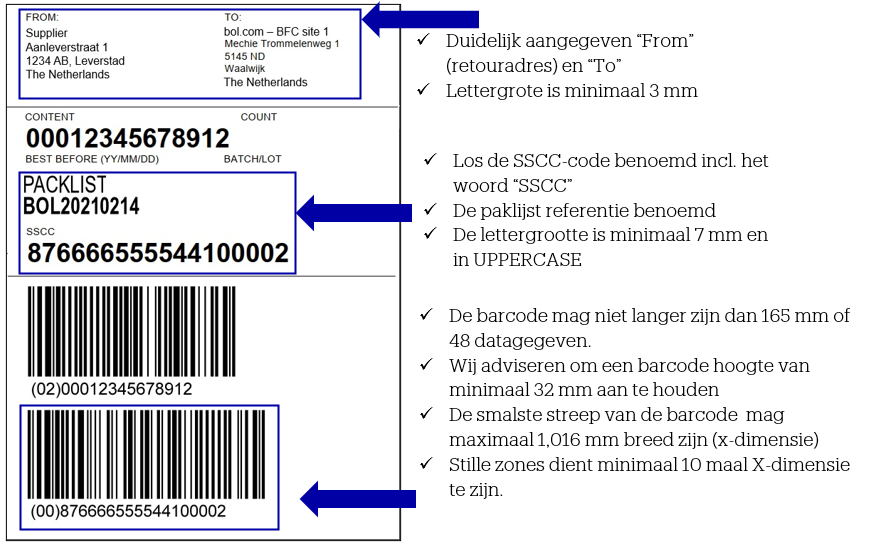
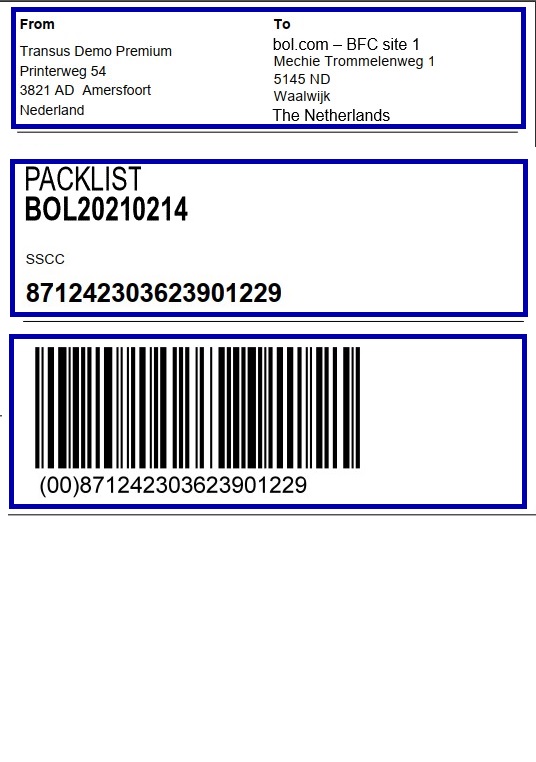
See below an example of an A6 label that meets both GS1 and bol requirements – useful as a reference when creating your own label.

This example shows a label for a mono pallet. Of course, mixed pallets can also be delivered.

Note! The blue fields are mandatory for deliveries to bol.

An example of a mixed pallet

Pre-announcement via a DESADV message including SSCC

It is important to consider the points below to correctly send a DESADV message including SSCC.

  • For suppliers with an EDI connection, the SSCC must be included in the DESADV message.
  • Make sure to consult the bol EDI manual to learn how the SSCC must be included in the DESADV message.
  • For issues/questions regarding SSCC and EDI, Transus is the first point of contact. Contact Transus for SSCC support by creating a support ticket in the Transus Portal or by sending an email to support@transus.nl.
  • SSCC codes must be sent in the EDI pre-announcement without the AI (Application Identifier). The AI is not part of the SSCC code.

Have you created a shipping label including SSCC and a pre-announcement via a DESADV message including SSCC? Go to this page to find how to prepare your shipment for dispatch, including the shipping label with SSCC.

Need extra help?

  • Wondering whether the label you created meets the GS1 guidelines? You can contact GS1 Netherlands; they have a support desk you can reach out to.
  • Do you have specific questions about EDI and SSCC? Then contact bol’s EDI team by emailing supplierorder@bol.com.
  • Have you carefully reviewed the information on this and the other SSCC webpages, but your question is still unanswered? Then contact Supplier Service (supplierorder@bol.com).
Related Topics